
OnlyFans gives subscribers no built-in way to compare creators before paying. Reading creator activity metrics on external ranking cards solves that problem by showing post counts, media totals, and update timestamps in one place. This guide explains what each number measures, where the data comes from, and how to weigh it against a subscription price. Platforms like BestOnlyFans publish these signals to help fans judge content consistency before spending anything.
A card can show a busy page that still delivers little value, and a quiet page can be worth every dollar. The goal here is not to chase the highest count on a listing site. The goal is to read the numbers correctly, spot stale or inflated figures, and connect what you find to the price you are asked to pay. BestOnlyFans refreshes its rankings every month.

Where Ranking Cards Display Activity Data
Ranking sites exist because OnlyFans has no discovery feed or directory of its own. Third-party listings fill that gap by collecting public signals and presenting them as sortable cards. Each card usually places the key numbers near the top, next to the creator name and price.
The most common fields are post count, media total, and a last-update stamp. Some sites add a frequency label such as daily or weekly. The placement matters less than the definition, because two sites can use identical labels for slightly different measurements.
| Metric Type | Typical Label | What It Actually Measures |
|---|---|---|
| Upload activity | Posts | Total posts made, including text-only updates and promotional messages |
| Content volume | Medias | Files uploaded, which may not equal files a new subscriber can view |
| Recency | Last Active | Last detected login, post, or message, depending on the crawler |
| Cadence | Post Frequency | Average interval over a rolling window, not a guarantee of future output |

A field labeled Posts may include free promotional messages that cost nothing to send but add to the total. The label alone never tells you whether the content is reachable on a standard subscription.
Decoding Post Frequency Claims
A page marked daily could post thirty times in one week and then go quiet for three. The label stays accurate on paper while the experience feels inconsistent to a paying subscriber.
Time windows also vary. A site might calculate cadence over thirty days, ninety days, or the entire lifetime of the account. A lifetime average punishes new creators and flatters old ones who used to post heavily. Shorter windows reflect current behavior but swing more sharply after a short break.
They are worth memorizing before you trust any cadence badge:
- Backdated uploads that fill an old gap in the timeline and reset the average
- Bulk photo sets split into many separate posts instead of one gallery
- Automated re-shares of older content that count as fresh activity
None of these are rule violations, and creators are free to post however they like. They simply mean the frequency label describes volume, not effort or originality. Treat it as one input among several rather than a promise.
Media Counts: Gross Numbers Versus Accessible Content
A media total is the largest number on most cards and the least reliable on its own. It counts everything ever uploaded, including items a new subscriber cannot open without paying again. Paywalled archives and expired promotional posts stay in the total forever.
The gap between gross and accessible content grows on older accounts. A page with three years of history may carry thousands of files, but only a fraction may sit behind the base subscription. Before paying, ask what portion of that archive is actually included.

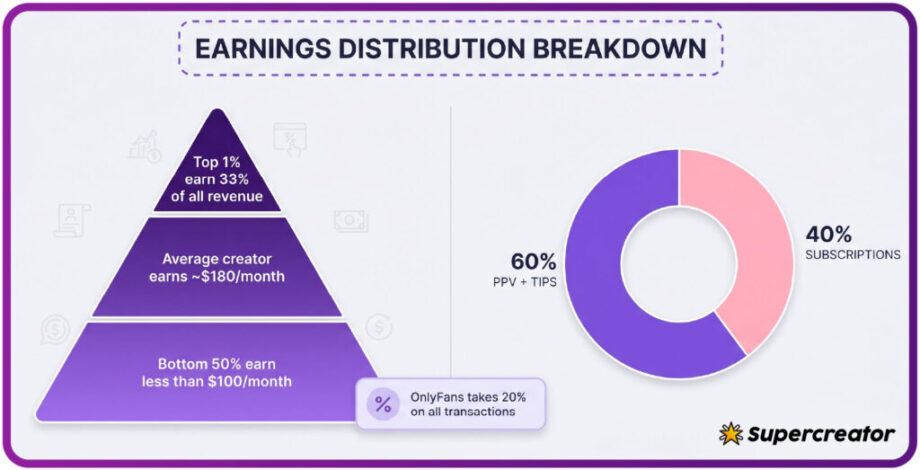
Pricing structure explains why this matters. The platform takes a 20% fee on everything, and the creator keeps 80%, so many pages rely on pay-per-view messages and tips to lift earnings above the base rate. PPV unlocks run up to $50, paid chat commonly sits at $3-$5 per message, and tips can reach $100.
That model is legitimate, but it changes how you read a media count. A high total with heavy paywalling means the base price buys access to a storefront, not a full library. A lower total with everything included often delivers more per dollar.
Update Timestamps and Data Freshness
A crawler cannot see private activity, so it records the last public signal it detected. That might be a new post, a profile change, or nothing at all if the page has been quiet.
The lag between real activity and a card update varies by site. Some refresh daily, others weekly, and some only when a page is submitted or claimed. A stale timestamp can make an active creator look dormant, which is why the pipeline behind the number matters.
The last-active date is a detection record, not a heartbeat. If a card shows a timestamp older than two weeks, verify the creator’s public socials before assuming the page is inactive.
The timestamp pipeline behind BestOnlyFans follows a defined sequence, and other sites use similar steps:
- Crawler detection picks up a public change on the profile or feed
- A verification interval confirms the change is not a duplicate or error
- Manual override triggers when a creator or fan reports a wrong date
- Displayed freshness indicators show how old the captured data is

No pipeline is instant, and none can see behind a paywall. The useful question is not whether a timestamp is perfect but whether the site tells you how old its data is. A visible freshness indicator is a sign of honest collection.
Cross-Referencing Multiple Ranking Sources
One card can be wrong. Comparing counts and timestamps across listing sites exposes collection methods, update lag, and occasional errors that a single source would hide.
| Data Point | Source A Behavior | Source B Behavior | Discrepancy Meaning |
|---|---|---|---|
| Post count | Counts every post including promos | Counts only media posts | Different definitions, not an error |
| Last active | Refreshes daily | Refreshes weekly | Source B lags behind real activity |
| Price shown | Displays current base rate | Displays cached older rate | Creator raised or lowered the price recently |
| Media total | Includes paywalled files | Counts visible files only | Archive is heavily locked behind PPV |
A post count that differs by a handful is normal. A difference of hundreds suggests one site stopped crawling or counts a category the other ignores.
Price discrepancies are especially worth checking. When a creator raises the price, auto-renew stops, and existing access lasts until the paid period ends. A cached price on a slow site can mislead you about what you will actually be charged at checkout.
Linking Activity Patterns to Subscription Value
Activity data only becomes useful when it meets a price. A fast page at a low rate and a slow page at a premium rate can both be good deals, depending on what you want. The comparison has to happen in dollars, not in raw counts.
Base subscriptions range from $4.99 to $49.99, though most paid pages sit between $4.99 and $15, with averages clustering around $5-$10. Free pages set the price to $0 and earn through pay-per-view messages and tips instead. Promotional first months can dip below $4.99, such as a $3 first month, but base rates cannot.

Four frameworks turn activity figures into a rough value estimate:
- Cost per post: divide the monthly price by the expected number of posts
- Cost per media asset: divide the price by the accessible files you can open
- Expected monthly output: multiply the stated frequency by four weeks
- Seasonal adjustment: discount months when creators historically slow down
A $5 page posting twice a week lands near sixty cents per post. A $25 page posting twice a month lands near three dollars per post. Neither is automatically better, but the math makes the trade-off visible.
Many subscribers also weigh presentation and tone alongside output. Collecting a few good onlyfans quotes from a creator’s public posts can reveal more about consistency and voice than any count on a ranking card.
Red Flags in Activity Metrics
They rarely prove bad intent, but they justify a closer look before you commit funds. Five patterns are worth flagging:
- All posts clustered inside a few 48-hour windows, suggesting scheduled dumps
- Media counts far exceeding visible posts, hinting at minimal content per update
- Timestamps clustering at round hours, a sign of automated scheduling
- Frequency increases shortly before a price hike, padding the card for shoppers
- Mismatched counts across listing sites, indicating one source stopped crawling
A single red flag is not disqualifying. Two or three together usually mean the card is optimized for discovery rather than for delivering steady value to subscribers. In that case, the safest move is to wait a month and recheck.
Building a Pre-Subscription Activity Checklist
Run it before any paid subscription, especially on pages priced above the typical $5-$10 cluster. It takes a few minutes and prevents most refund regret.
- Check the timestamp range to see whether posting is steady or bursty
- Compare counts across at least two ranking sites
- Confirm recent activity on the creator’s public social accounts
- Review price history to spot recent increases or promotions
- Assess sample content where the platform or creator offers any
A card verification hold of $0.10 may appear when you add a payment method, and it is refunded within days. If a creator raised the price, auto-renew stops and your access continues until the paid period ends, so you are never charged the new rate without notice.

Enable two-step authentication in settings and keep payment details current. Activity metrics help you decide where to spend, and basic account hygiene protects what you spent it on.
FAQ
Can a creator manipulate their appearance on ranking sites?
Creators can influence metrics indirectly by posting more, splitting galleries into multiple posts, or scheduling bulk uploads. Manipulation is limited to shaping the underlying activity, not falsifying the card itself.
Why do two ranking cards show different post counts for the same creator?
Different sites define posts differently. One may include text-only updates and promotional messages, while another counts only media posts. Update frequency also varies, so a slower crawler may simply be behind.
How recent should “last active” be before I consider subscribing?
A timestamp within a week is a reasonable threshold for most paid pages. Older dates are not automatic deal-breakers, but check the creator’s public socials first to confirm the page is still running.
Does high post frequency always mean better subscription value?
No. Frequency measures volume, not quality or accessibility. A page posting daily with most content locked behind pay-per-view can deliver less than a slower page where everything is included at the base price.